Free starter pack
AI study notes template
The notebook I built for my Korean classes, cleaned up for any subject. You don't fill it in by hand: paste one prompt into your AI tool, dump in your syllabus, and it builds the whole thing.
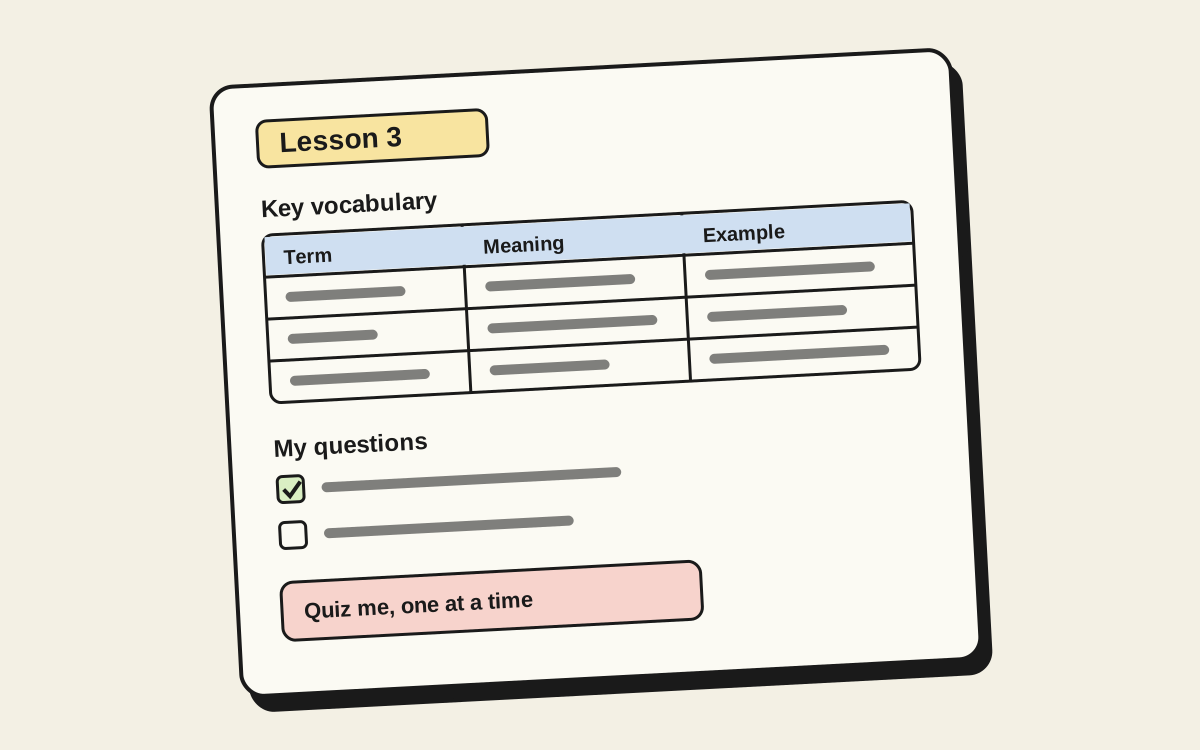
I started it for my Korean notes: one page per lesson, with the vocab, my questions and practice in the same place every week. Then I wrote a prompt that gets an AI to set up a whole course from it, so every lesson page is waiting before class starts.
Nothing in it is Korean-specific. It works for anything with chapters: languages, coding, history, an exam, a certification.
- About 10 minutesmost of it finding your syllabus
- Notion or MarkdownObsidian and other notes apps work too
- Any AI toolClaude, ChatGPT, Notion AI
How it works
Copy the prompt
It's below. Fill in the brackets at the top: what you're studying, your level, your goal and deadline.
Dump in everything you have
Syllabus, the textbook's table of contents or PDF, class links, old homework. The more it gets, the less it guesses.
Let it build
If your AI tool is connected to Notion, it builds right in your workspace. If not, it writes Markdown pages you paste into Obsidian or wherever you keep notes. Either way you get a course page, a weekly lessons list, and a page per chapter.
Study with it
Before class, skim the lesson page. After class, add your own examples and questions, then use the lesson's prompts to get quizzed.
The prompt
This builds the whole study space. It includes the full structure, so it works even if your AI can't open Notion.
You're helping me build a personal study workspace. Build it in my Notion (or, if you can't access Notion, as Markdown pages I can paste into Obsidian). Use the "AI Study Notes Template" page I've linked if you can open it: keep its sections, database properties, and lesson layout. If you can't open it, use the BLUEPRINT below. It's the same structure.

BLUEPRINT (use this if you can't open the template)

Page 1: [Course name] Study Space
- Course Structure: course name, what it covers (1–2 sentences), format, units/chapters, schedule
- Links: textbook, questions doc, live class/video call, other resources
- Weekly Lessons (a database in Notion, or a table in Markdown)
- Ask AI tips: point it at the source, ask for examples, get quizzed, have it check your work, save good answers, double-check facts

Weekly Lessons database properties:
- Title (title): "Lesson 1: [title]"
- Lesson # (number)
- Week / Date (date)
- Chapter / Unit (text)
- Status (status): Not started / In progress / Done
- Notes (text)

Each lesson page (inside its row, or one Markdown file per lesson):
- Header lines: Chapter / Unit, Date, Source (pages, video, slides)
- 🔤 Key vocabulary / terms: table with Term | Meaning | Example / note
- 💡 Main concepts: bullets, in plain words
- 🧩 Examples: one from the material, space for one of mine
- ❓ My questions: checkboxes
- 🤖 Ask AI prompts: 4–6 prompts tailored to this chapter (quiz me one at a time, explain simply with an example, make practice questions and check my answers, summarize in 5 bullets, common mistakes, answer my questions using the textbook)
- ✍️ Practice / homework: checkboxes
- 🔁 Review notes: What I learned, Still unclear, Review again on [date]

ABOUT ME
- What I'm studying: [subject / course name]
- My level: [beginner / intermediate / advanced]
- My goal and deadline: [e.g. pass the final exam by June]
- Course format and schedule: [e.g. weekly live class + textbook, 12 weeks]

CONTEXT DUMP
[Paste everything you have: syllabus, textbook table of contents, textbook link or PDF, class / video call links, notes, homework, past tests...]

WHAT TO BUILD
1. Course Structure: fill in the course name, what it covers, format, units/chapters, and schedule from my context.
2. Links: add every link I've given you (textbook, questions doc, live class, other resources). Leave a placeholder for anything missing.
3. Weekly Lessons database: one row per lesson or chapter, pre-filled with Lesson #, Title, Week/Date, Chapter/Unit, and Status = "Not started".
4. One lesson page per chapter (inside each row), using the Lesson Template sections:
   - Key vocabulary / terms
   - Main concepts
   - Examples
   - My questions (leave space for mine)
   - Ask AI prompts tailored to this subject and chapter
   - Practice / homework
   - Review notes
   Pre-fill from my material where you can. Don't invent facts the material doesn't support, and clearly mark anything you're guessing.

BEFORE YOU START
If something important is missing, ask me up to 3 short clarifying questions first. Otherwise, go straight to building.

WHEN YOU'RE DONE
- Give me the link(s) to what you built.
- Explain in a few lines how to use it each week.
- Suggest a simple weekly study routine that fits my schedule and deadline (e.g. preview, class, review, self-quiz, spaced review).
Using Notion? Duplicate the template first and share it with your AI, so it builds on the real thing.
What every lesson page has
- 🔤 Key vocabulary: term, meaning, and an example, in a table.
- 💡 Main concepts: in plain words, yours.
- 🧩 Examples: one from the material, one you make up.
- ❓ My questions: checkboxes, so you know what's still open.
- 🤖 Ask AI prompts: quiz me one at a time, explain with an example, make practice questions and check my answers.
- ✍️ Practice: homework and exercises.
- 🔁 Review notes: what I learned, what's still unclear, and when to look again.
Learning Korean too? The Hangul breakdown splits any syllable into its letters, with sounds and names in English.
No Notion? Use the Markdown version
Same structure, as plain files for Obsidian or any notes app:
- Study space: course structure, links, the weekly lessons table and the Ask AI tips.
- Lesson template: one copy per chapter.
Free to use, copy and change, for yourself or your class. No account or email needed from me, though Notion and your AI tool have their own plans. (Why it's all free.)